


มุมโฆษณา
Related Items


ภาพข่าว


มุมโฆษณา
|
ร้าน ถ่ายรูปด่วน ที่ โลตัส บ้านฟ้าปิยรมย์ คลอง 6 ลำลูกกา ปทุมธานี (กล้อง อุปกรณ์ถ่ายภาพ / บริการถ่ายภาพ)ร้าน ทูโพโต้ ดอท คอม นอกจากจะให้บริการ อินเตอร์ เน็ต และเกมส์ออนไลน์แล้ว ยัง เปิดเป็นศูนย์ถ่ายรูป ด่วนดิจิตอล Digital Photo กับบริการการถ่ายรูปด่วน ... |

ประเด็นน่าสนใจ ร้านเน็ต ร้านเกม


 MyBlog - ข่าวไอที ทั่วไป Hiren's BootCD From USB Flash Drive (USB Pen Drive)
Hiren's BootCD From USB Flash Drive (USB Pen Drive)


แก้ไขล่าสุด ใน วันพุธที่ 02 มิถุนายน 2010 เวลา 19:36 น. เขียนโดย cybergame-shop วันพฤหัสบดีที่ 10 ธันวาคม 2009 เวลา 00:32 น.
Step 1
Connect USB Pen Drive (256Mb or more)
Step 2
Download and Run USB Disk Storage Format  usb_format.zip (34KB)

Step 3
Download and Run grubinst_gui grub4dos.zip (147KB)

Step 4
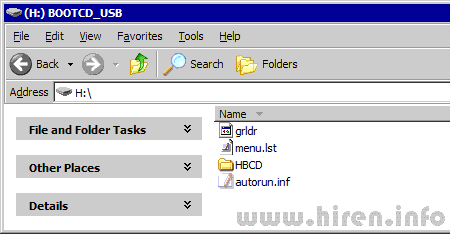
Copy grldr and menu.lst (from grub4dos.zip) to the usb drive
Step 5
Insert the BootCD (9.7 or newer) in the CD Drive and Copy everything from CD to USB Flash Drive
Step 6
Test Your USB Drive (read bottom of the page for troubleshoot)
dekcyber.com เด็กไซเบอร์ ! หาเพื่อน Dekcyber.com โอกาสของเด็กเล่นเน็ต เล่นเกมส์
Make sure you set your computer to boot from USB Flash Drive
To Enter the BIOS press the "Del" button on your keyboard. Alternatives are "F1", "F2", "Insert", and "F10". Some PC's BIOS might even require a different key to be pressed. Commonly a PC will show a message like "Press [Del] to enter Setup" to indicate that you need to press the "Del" key. Some AMI BIOS require you to enable the option "USB Keyboard Legacy support"!
For AMI BIOS:
- Go to "Feature Setup". "Enable" these options: "USB Function Support",
"USB Function For DOS" and "ThumbDrive for DOS". Go to "Advanced Setup".
Set the "1st Boot Device" to "USB RMD-FDD".
Reboot the PC and it now should boot from the Usb Stick.
- Go to "USB Mass Storage Device Configuration". Select "Emulation Type"
and set it to "Harddisk". Go to the "Boot Menu" and set the "1st boot device" to "USB-Stick". Exit the BIOS, saving the changes.
you can try "Emulation Type" to "Floppy" or "Forced FDD".
For PHOENIX/AWARD BIOS:
- Go to "Advanced BIOS Features". Go to the "1st Boot device" and set it to "USB-ZIP".
Troubleshoot
If you get GRLDR error then use syslinux to boot grub4dos
Dim lights Embed Embed this video on your site
- Author Articles
- More from this author:ร้านอินเตอร์เน็ต กับข่าว Dota 6.60 (13576 Hits)
Dota 6.60 Map Download - Dota-Allstars 6.60 Official Map (Changelogs Added!) � .60 Map Download - Dota-Allstars 6.60 Official Map has just released! Woohooo!!! Our long await of...WEDO: We Dancing Online (1453 Hits)
เกมแนว Music Battle ที่มีภาพตัวละครและฉากน่ารัก สดใส ด้วยไอเทมเสื้อผ้า...Point Blank (910 Hits)
เกม FPS แนวใหม่...Special Force (1307 Hits)
Special Force เป็นเกมออนไลน์เเนว Military FPS (First Person Shooting) จากประเทศเกาหลี... - Latest Articles
- Latest Articles:เกมส์ออนไลน์ S4League เกม Shooting สุดมันส์ (174 Hits)
 เกม S4 League นั้นเป็นเกม TPS (Third Person Shooting) เกมแนวยิงปืนมุมมองบุคคลที่สาม S4 League...
- Most Read Articles
- Most Read Articles:


 Subscribe to this comment's feed

